Clubex POS

Offline-first, voucher-smart POS for European clubs. Fast at the counter, robust offline, clean reporting.

Offline-First Voucher Printing Multi-Printer BYOD

Common POS scenarios

Use Clubex POS the way your event runs. Pick the flow that fits — vouchers to redeem later, instant prep by station, or a central cashier dispatching to multiple areas.

Customer buys 6 items → gets 6 single vouchers

Perfect for tournaments and family days: sell quickly at a central cashier, let people collect their items whenever they want.

  1. Cashier selects products and completes the sale.
  2. POS prints one small voucher per item (e.g., 6 slips for 6 items).
  3. Customer redeems each voucher at the right station at any time.

Reduces queue time at the bar or grill and keeps the counter moving.

Make-to-order: print per station, prepare on the fly

Great for fresh food (grill, food truck). Stations only see what they must prepare.

  1. Cashier finishes the order.
  2. POS prints a station voucher for each station with relevant items.
  3. Kitchen/bar prepares immediately; customer waits or returns later.

Less confusion: each station slip lists only what they need to make.

Central cashier → multiple stations

Keep all payments at one place while routes go to bar, grill, desserts, etc.

  1. All items are paid at the central cashier.
  2. POS routes vouchers per station (bar, grill…) automatically.
  3. Staff call order numbers or hand out items as they’re ready.

Works with both station-grouped or item-level slips.

Pay at the bar → print grill vouchers only

Serve drinks immediately at the bar; only grill items get prep vouchers.

  1. Cashier adds drinks and grill items, takes payment at the bar.
  2. Bar serves drinks right away — no bar voucher printed.
  3. POS prints vouchers only for grill items; customer hands slip to grill.

Keeps the bar line fast while the grill works from its own tickets.

Pickup window / takeaway

Ideal for busy halftime or post-match rush.

  1. Cashier sells and prints a pickup voucher with order number.
  2. Kitchen prepares; number is announced on pickup.
  3. Customer shows the voucher and collects the bag.

Optional: print one extra prep slip for the kitchen.

Bar-only quick serve

Fast drinks, optional vouchers if you need a record.

  1. Cashier taps items and collects payment.
  2. No station routing needed for drinks; optional single customer slip.
  3. Reprint is available with audit trail.

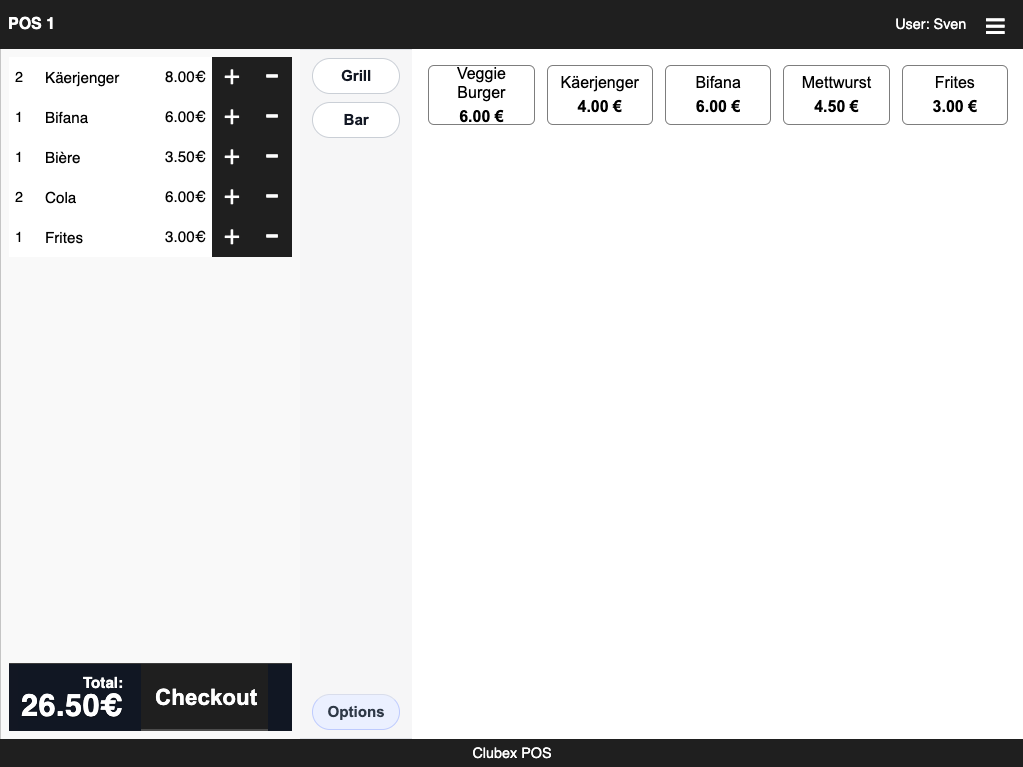
For speed, keep layout simple and large buttons.

Why Clubex POS?

Purpose-built for matchdays, tournaments, and club events — simple to use, rock-solid offline, and voucher-smart.

Offline-ready on Raspberry Pi

  • Local server, local SQLite database
  • Works without Internet
  • Sync & updates when online

Multi-printer support

  • ESC/POS USB & network printers
  • Per-station printer assignment
  • Typed print status & logs

BYOD: phones & tablets

  • No apps — runs in the browser
  • Low-latency local Wi-Fi printing
  • Central cashier mode supported

Layouts & voucher designer

  • Tabs, product grouping & order
  • Logo, lines, prices, alignments
  • Per-event overrides & fallbacks

Cloud setup & sync

  • Configure online, deploy to Pi
  • Secure multi-club (tenant) model
  • Sales & reports back to cloud

Voucher printing modes

Choose how receipts/tickets are printed for each event. Mix modes per station if needed.

Transaction-grouped

  • One voucher per order (customer copy)
  • Includes all items + totals
  • Great for central cashier setups

Station-grouped

  • One voucher per station (bar, grill, etc.)
  • Only the station’s items are printed
  • Fast routing, fewer lost tickets

Item-level

  • Separate voucher per item or product group
  • Ideal for made-to-order items
  • Optional modifiers/notes on each slip

Routing & design

  • Per-event product → station mapping
  • Kitchen/Bar printers can differ
  • Voucher designer (logo, lines, bold, alignment)
  • Order notes & modifiers printing

Operations

  • Reprint with audit log & typed status
  • Partial prints & retry queue offline
  • Print dedupe & error reporting
  • Time stamps, cashier, station, order ID

Restaurant mode Coming Soon

Purpose-built workflows for seated service while keeping voucher routing and offline resilience.

Tables & areas

  • Table map with sections/areas
  • Dine-in, takeaway, pickup workflows
  • Seat assignments (optional)

Coursing & firing

  • Starters / mains / desserts tickets
  • Fire per course to kitchen/bar
  • Hold & send items later

Split / merge bills

  • Split by seat, item, or amount
  • Merge tables & transfer items
  • Tips, service fee, VAT handling

Kitchen Display (KDS)

  • Optional KDS + printer fallback
  • Item status: queued / in-prep / done
  • Sound/visual alerts per station
Built in the EU • BYOD-friendly • Works offline on Raspberry Pi

Screens

How it works

1

Prepare in the cloud

Create products, stations, POS layout, and voucher templates.

2

Sync to Raspberry Pi

Pi pulls the configuration; volunteers connect via Wi-Fi.

3

Sell offline & print vouchers

Pick the right print mode (transaction, station, item) per event and route instantly.

4

Sync sales back

When online, Pi pushes transactions & reports to the cloud.

Technical specifications

Runtime

  • Node.js server on Raspberry Pi
  • SQLite local database
  • Same codebase cloud ↔ Pi

Printing

  • ESC/POS USB & network printers
  • Per-station printer mapping
  • Retry queue, typed status, reprint audit

Security

  • RBAC, entity-scoped access
  • Audit & login attempt monitoring
  • GDPR-ready data export

Clients

  • Modern browser (no app install)
  • Phones, tablets, laptops
  • Local Wi-Fi, low latency

Made for European clubs • Hosted in EU

FAQ

Can I choose how vouchers print?

Yes. Pick transaction-grouped (one slip), station-grouped (per station), or item-level (per item/group). You can mix modes per event and add modifiers/notes to slips.

Does it work without Internet?

Yes. The Pi runs the POS server and stores sales locally. When Internet returns, sales and reports sync to the cloud.

Which printers are supported?

ESC/POS thermal printers via USB or network. Kitchen and bar can use different printers mapped per station.

What about restaurant-style seating?

Restaurant mode is coming soon: table map, coursing/firing, split/merge bills, KDS, tips/service, and more — while preserving voucher routing and offline behavior.